


2023.07
For any organization, effective project management is a crucial determinant of success. That is why we are pleased to present the latest release of FlexiProject, which introduces several innovative functionalities designed to make daily project work easier and more efficient. Among the new functionalities are editable project reviews, the ability to display applications in new languages, different types of relations, creating relations between different projects, and much more. Check it out for yourself.

Editable design reviews
We start our list of changes to the app with an overhaul of the design reviews functionality. In previous app versions, the system predetermined the review form, which could not be changed. Now, each organization can build its form with which project managers can report progress on a project. This will be done by going to PMO -> Reviews -> Templates. The system will allow several forms to be built, and the build method will be the same as in the project charters. The template will allow you to add to the form elements that will pull in automatically from the project, such as, but not limited to, milestones completed in the last 30 days, milestones to be completed in the next 30 days, active risks, deliverables to be completed and completed.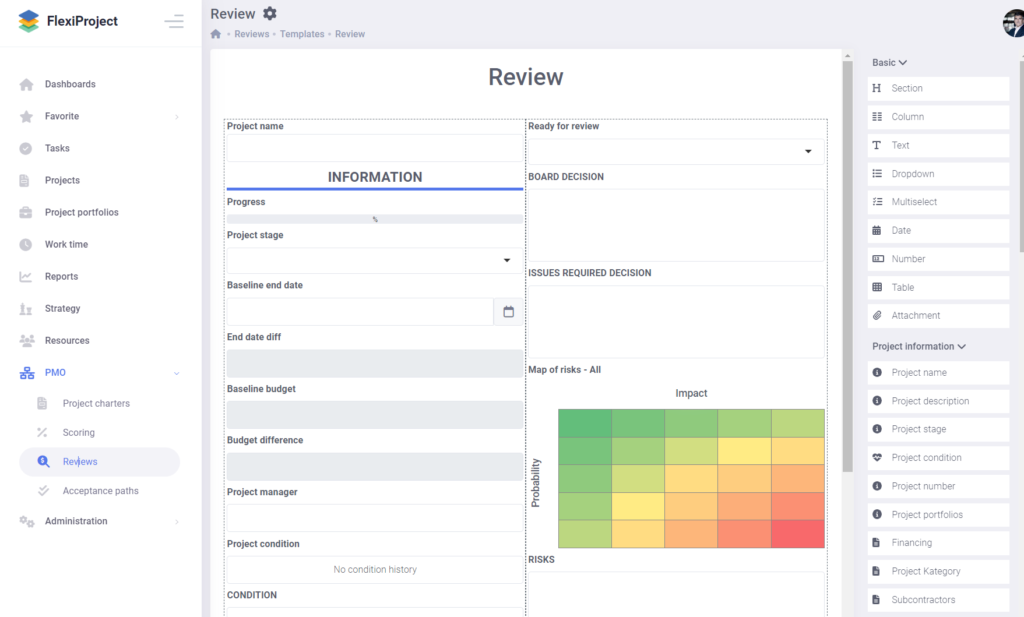
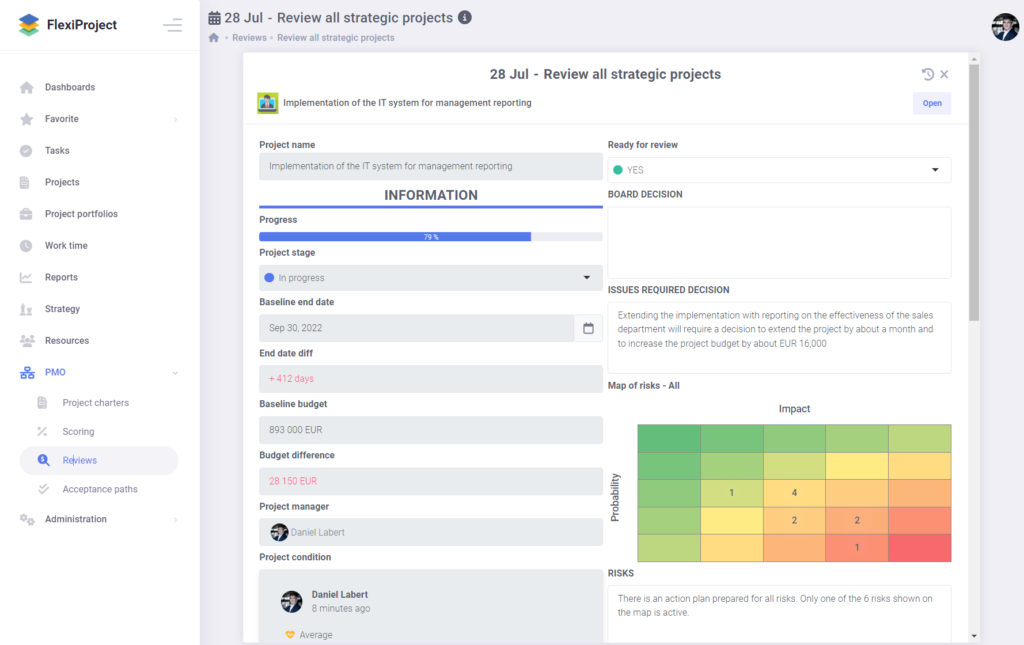
How new reviews are created remains the same. The only thing that remains unchanged is that when creating a review, it is necessary to indicate which form to use. There is also an option to create groups, which may facilitate work in the case of many reviews in the list and creating a new review based on an already created review. The review details for a single project have been extended to include the function of adding comments and the possibility of accessing historical reviews created for a given project.
Project condition
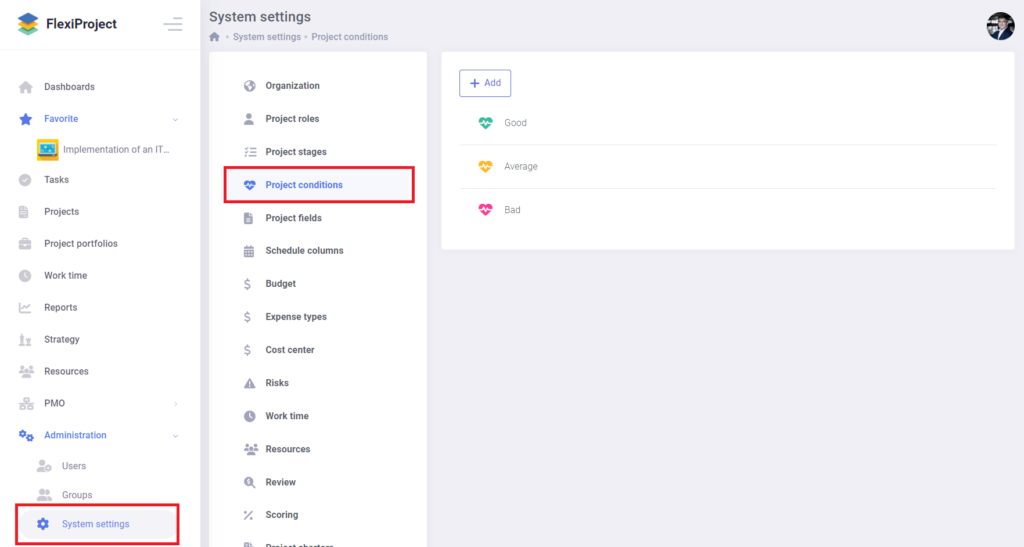
The option to define custom values for the project condition has appeared in the system settings. This will allow you to edit the previously default options: Good, Medium, Bad, or add new ones. How conditions are added for a project has also changed.
The condtion will be visible in the system’s latest version as a heart icon behind the project name. Clicking on the icon will allow us to change the condition for a project and track the entire history of changes. When adding a condition to a project, we will also have the option to add a comment describing the state of the project in more detail.


Translating the application
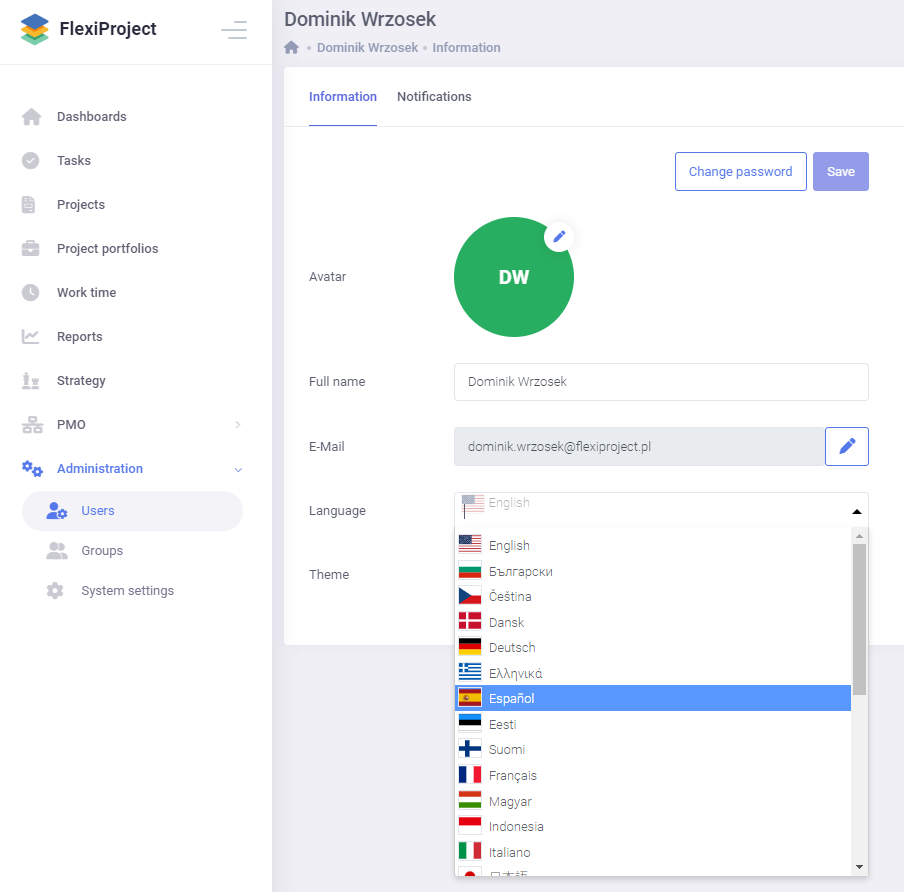
The FlexiProject application has been expanded to include more languages such as Bulgarian, Czech, Danish, German, Greek, Spanish, Estonian, Finnish, French, Hungarian, Indonesian, Italian, Japanese, Lithuanian, Latvian, Norwegian, Dutch, Portuguese, Romanian, Russian, Slovenian, Slovak, Swedish, Turkish and Chinese. Each user can change the language individually in the user profile.
Extension of relations on the schedule
Relations between tasks on the schedule have been extended with additional types, i.e., start-start, end-end, and start-end. When adding a relation through the schedule item selection window, we must select the type of relations connecting two tasks. In addition, the option to create a relation has been extended to allow the creation of a relation between collective tasks/phases. The relation will move the collective tasks/phase together with the subtasks, keeping the appropriate proportions between the elements.


Relations between projects
The new version of the application also includes the ability to create relationships between tasks from different projects. When creating a relationship, the user can decide whether the relationship applies to this project or another. When you select a relationship from another project, a window appears where you select a project and a schedule item from that project. The user can create relationships only between tasks from projects to which he has access.


A relation is purely informational and does not change the dates of a task in any way. Information about the relation is visible in the task details, and we can display the relations between projects in the project portfolio.


Option to turn off the budget
For organizations that do not use the budget functionality they can turn it off in the system settings. Turning off the functionality hides the budget tab on the project and in portfolios, hides reports for budgets and financial items in tasks, project charters, reviews, and project plans.

Option to turn off the risks
As well as the budget, there is an option to turn off the risks functionality in the system. Organizations that do not use risks can turn them off, and then the risk tabs on the project are hidden, reports for risks are hidden, and the ability to display risks in tasks, project sheets, and project reviews is hidden.

Extending reports
Once again, reports in FlexiProject have been extended with new capabilities. In this release, there are options to create dynamic filters for many report types, e.g. end date less “Today”. In addition, there is also the option to search for items with deviations from the base plan, e.g. end date less than planned end date, or expenditure greater than planned expenditure. The user filters from the new release will also display user avatars. In the reports for tasks and milestones, we will also be able to display new columns such as last change, closing date, end deviation.


Grouping and changing the width of columns in the list of projects
In the Projects tab, it is now possible to group projects by stages, managers, and other properties displayed in the project list. Grouping on several levels is possible and is determined by the order in which properties are selected. Grouping is an individual setting for each user. In addition, it has become possible to change the width of individual columns in the project list.

Filtering by project fields in the project list and portfolios
Filters on the project list and project portfolios screen have been extended to allow filtering by custom attributes created for projects. To use these filters in the filtering screen, select the “More” option at the end of the window and assign the appropriate filtering conditions.

Ability to comment on other tasks for the standard license
Those with a standard license have gained the ability to comment on tasks that they have access to but do not own. Previously, this functionality was blocked.

Tasks from archived projects
With the new release, the tasks tab will not show tasks from archived projects assigned to a user. To see tasks from archived projects, click the ‘Filter’ button and select Archiving: show archived projects. Tasks from archived projects will be visible in the task list with an archive icon next to the project name.

Overdue task notifications
The daily task start and end notifications have been enhanced with an overdue task section. If you want the daily email to list all tasks that have not yet been completed and their end date has passed, you should have the “Overdue tasks” notification enabled in your user profile under the notifications tab.

Import from MS Project with relations
Due to the expansion of the relationship between tasks, the import from MS Project has also been expanded. Now imported files from MS Project will pull in all relationships. Due to minor differences in logic between MS Project and FlexiProject, the relationships pulled may cause dates to change for some items. If this occurs, a list of tasks for which dates have been changed will be displayed before importing the revised schedule.

Extension of currencies
The available currency options have also been extended along with the extension of languages in the application. In the new release, all currencies of the World will be available. To change the currency for an organization-wide budget, go to system settings and the budget tab.

Manager in project roles
The FlexiProject system has only one default project role, ‘ Project Manager.’ Each organization itself can enter the rest of the project roles. The lack of information about the default manager role often caused users to create an additional “Project Manager” role. With the new release, the system’s default Project Manager role will be displayed in the project role settings to avoid this complication.

Reversing history in tasks
To make it easier for you to keep track of changes on the schedule, we decided to change the sorting in the item details. Now, when you go to the “History” tab on tasks, the most recent changes will be displayed at the top of the tab.

