


Project portfolio software for efficiently managing strategic goals
Project portfolios are the key to effectively managing multiple projects simultaneously. With FlexiProject’s project portfolio software, you can easily track the progress of each project and observe dependencies at the strategic level.
Create portfolios that align with the company's strategic objectives
FlexiProject is a versatile tool that lets you create multiple project portfolios. You can assign a project to more than one portfolio at a time.
For example, an IT project can be a part of the technology and strategy portfolios. Furthermore, you have the flexibility to personalize the content of the main view of each portfolio by selecting from a range of parameters.
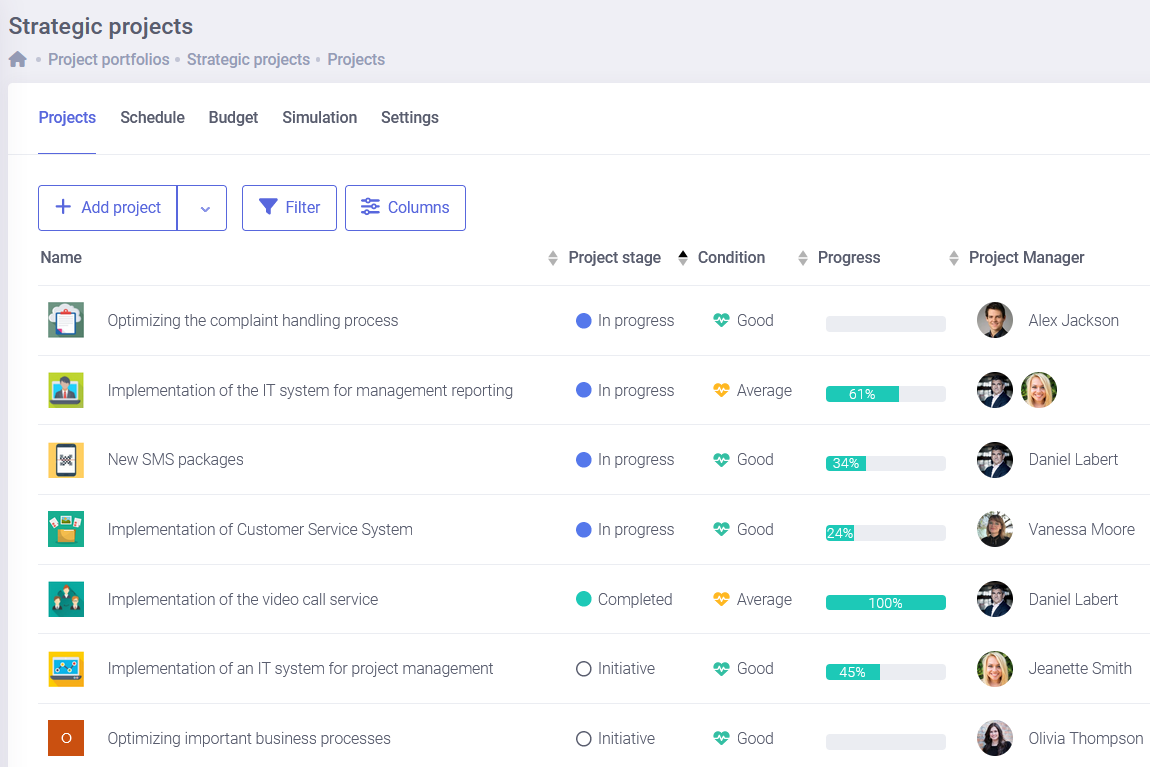
The roadmap of projects provides a clear overview of project progress
A roadmap of the projects in a portfolio is a clear and consistent source of information for management regarding the status of each project.
It allows management to quickly compare the current project status to the plan, track milestones, project distribution over time, dependencies between projects, and the stage of each project. The portfolio owner determines which parameters are displayed on the project roadmap.

Track the financial progress of projects in your portfolio
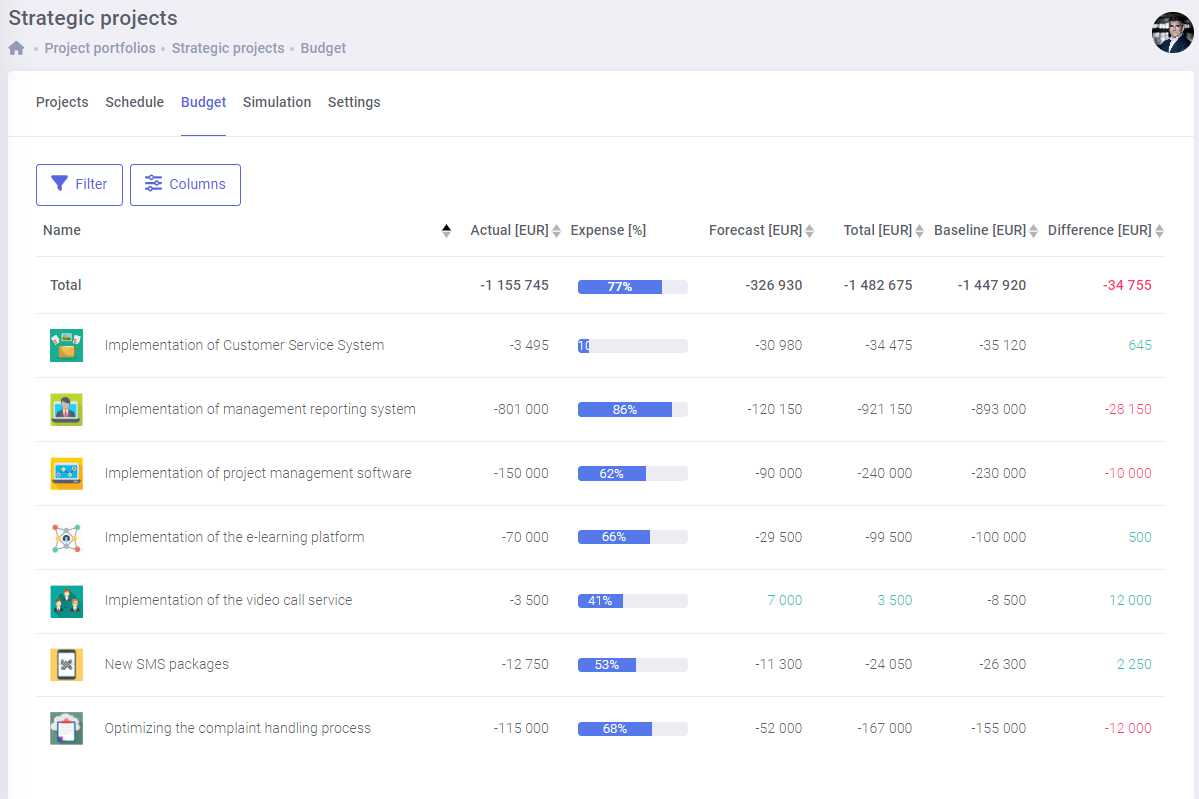
FlexiProject provides an aggregate view that enables you to track the financial progress of all the projects in your portfolio.
With the global view, you can monitor the variances to plan for each project and the overall variance for the entire portfolio. You can easily keep an eye on the revenues and costs of each project and track their progress.
Experience the full power of FlexiProject with unrestricted access for 30 days—completely free, with no hidden fees or charges. Start your trial today and see how FlexiProject can enhance your project management and team productivity!
Evaluate projects and select the best ones for your portfolio
Using the scoring functionality, we can evaluate all the projects assigned to a particular portfolio.
This functionality provides a graphical representation that helps you identify the most attractive projects in the portfolio. By comparing the attractiveness of each project, you can select the best ideas for implementation.

Build your own project portfolio reports
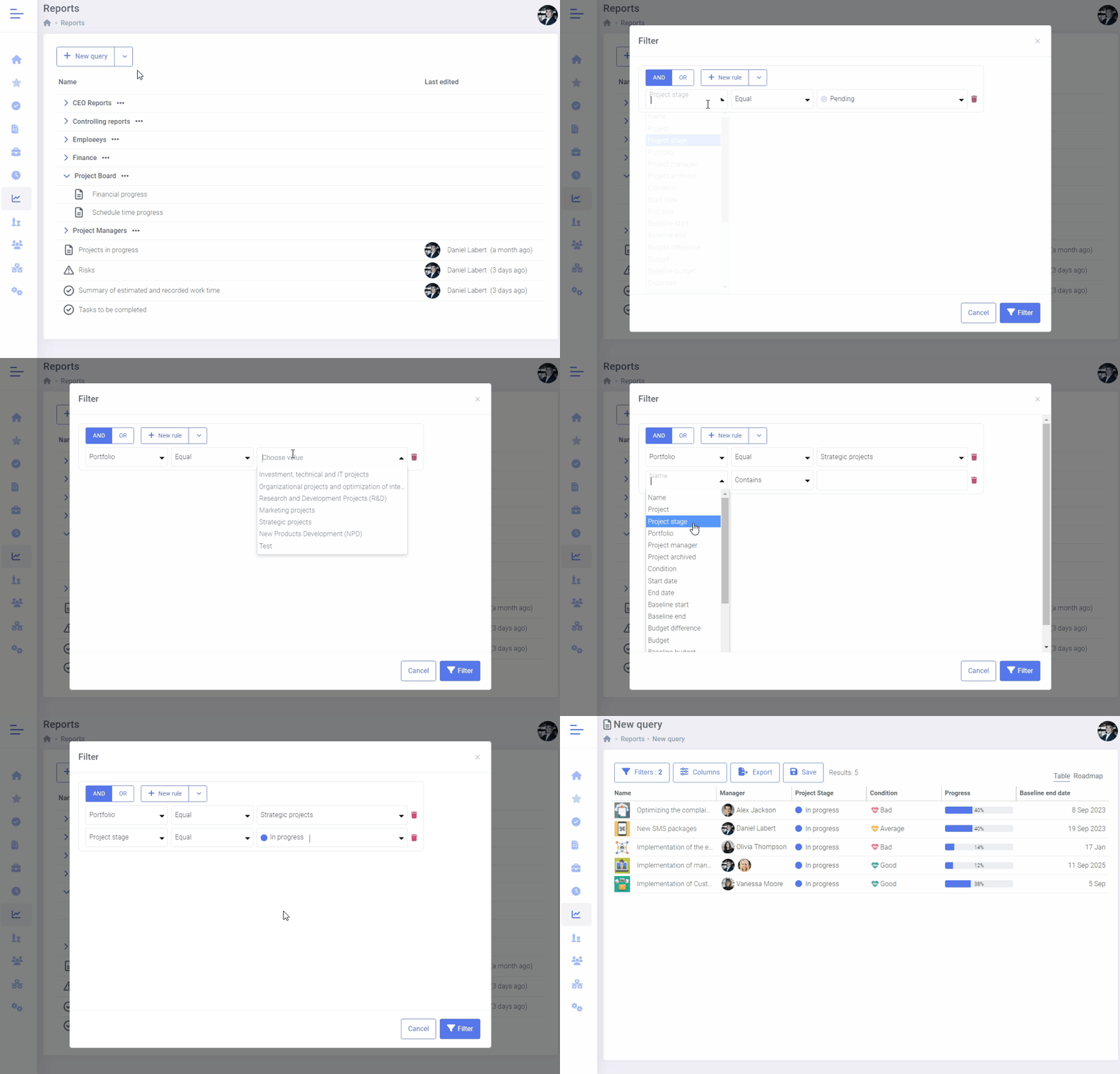
With FlexiProject, you can design custom reports that provide detailed information on project portfolios.
You can create reports on potential project risks, milestone statuses, and delayed tasks.
Gantt Chart color-coding in project portfolios
Users now can choose which attributes to use for color-coding the Gantt chart, such as progress, project phases, project status, or other project fields (e.g., single-choice lists).
This feature allows for more intuitive and precise project progress tracking by customizing the chart according to selected attributes.

Monitor and oversee progress with project milestones
Track project progress with a milestone status column available in portfolio views, reports, and project reviews.
Milestones are arranged chronologically—green indicates completed stages, while red highlights delays. This allows you to assess progress and identify areas that require attention quickly.

Graphic summary available in project portfolios
Graphic summary is available in three main areas of the system: project portfolios, project overviews, and project reports. It enables quick analysis of key indicators such as project statuses, budgets, delays, risks, tasks, milestones, and custom fields.
Users can freely add, remove, edit (change data scope and filters), and rearrange widgets. All changes are saved automatically, allowing the view to be easily customized to individual needs.

Monitor risks at the portfolio level
In the portfolio view, the “Risks” tab provides an aggregated overview of all risks identified in projects within the portfolio (visible when the Risks module is enabled in system settings).
It allows users to display data available in the reports module (e.g., name, status, owner, probability, impact, source project), as well as sort and filter by key attributes. By clicking a risk’s name, users can quickly navigate to its details in the source project.

Organize regular reviews for each portfolio
You can easily organize a review of the progress of projects in the portfolio for the board and steering committee.
Each project manager will automatically be notified when you set a review date. The system will ensure that each manager prepares well for the review and provides the necessary information.

Frequently asked questions about PPM software
What is project portfolio management (PPM) software?
PPM software helps organizations plan, prioritize, and oversee all their projects in one place — not as isolated tasks, but as a strategic portfolio. FlexiProject gives PMOs a single view of every project’s status, budget, resources, and risks, so leadership can decide which initiatives to fund, pause, or accelerate based on real data, not gut feeling.
How is PPM software different from regular project management tools?
Standard tools track individual tasks and timelines, but weren’t built to manage a whole portfolio. PPM software adds the layer above: portfolio dashboards, resource capacity across all projects, project scoring and approval, and strategic alignment. FlexiProject combines detailed execution with portfolio-level control — no stitching together spreadsheets and separate apps.
Who is FlexiProject's PPM software for?
It’s built for PMOs and portfolio managers in organizations with 250+ employees — especially engineering, manufacturing, and R&D. These teams run dozens of complex, interdependent projects, where one missed dependency can derail delivery. FlexiProject gives them enterprise PPM control without the heavy setup and consultant dependency of legacy systems.
Can FlexiProject replace legacy PPM systems or Microsoft Project?
Yes. Teams switch to FlexiProject from legacy PPM platforms and Microsoft Project for modern, agile portfolio management without months of implementation. It covers portfolios, schedules, Gantt charts, resources, budgets, risks, and strategy in one platform — up and running in days, not quarters. Start with a free trial and migrate at your own pace.
How does PPM software help the PMO prioritize projects and plan resources?
FlexiProject scores projects against shared criteria, shows their impact on strategic goals, and matches resource demand against your teams’ real availability. This lets the PMO see which projects deliver the most value, where people are short, and which initiatives overload the portfolio — and set priorities before projects start slipping.
What portfolio features does FlexiProject offer?
FlexiProject is complete PPM software: project portfolios with dashboards and roadmaps, project scoring and approval, resource and budget management, a portfolio-level risk register, Gantt charts, and a strategy module linking projects to company goals. Everything in one system, instead of several disconnected tools and spreadsheets.
Is FlexiProject a good fit for engineering, manufacturing, and R&D companies?
Yes — that’s our core audience. We built FlexiProject for portfolios of engineering, manufacturing, and research projects, where dependencies between projects, cost control, and the availability of specialized teams are what matter. The system handles many parallel projects, stage-gate decisions, and long product development cycles.
How long does it take to implement FlexiProject PPM software?
Far less than legacy PPM systems. Most teams start within days: they import a few projects, configure portfolios, and immediately see dashboards, resource views, and reports. There’s no months-long rollout and no consultant team — FlexiProject is ready to use right away, and you expand the configuration gradually as needed.
How do we get started with FlexiProject?
Start a free trial with no credit card required and explore the full portfolio management features with your own projects. Prefer a guided walkthrough? Book a demo and we’ll map FlexiProject to your PMO’s portfolio and processes. Most teams begin by importing a few projects to see the dashboards, resource views, and reports in action.
Contact us to learn more about FlexiProject details
If you want to explore the full capabilities that FlexiProject offers, feel free to talk to our specialists.
