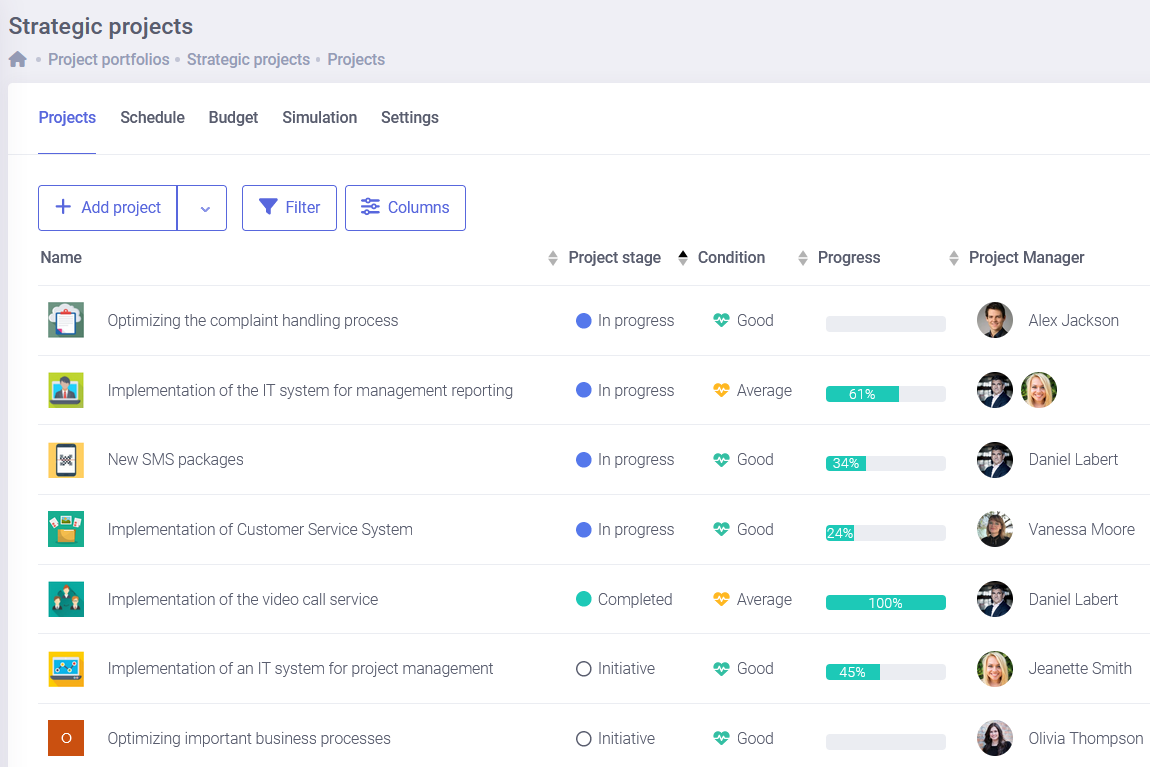
IT team management software for the whole IT department
FlexiProject is IT team management software for the projects a service desk was never built to run: rollouts, migrations and infrastructure work. Plan the work, prioritize requests and report on every initiative in one place.
Everything the IT department needs to deliver its projects
Plan the work, balance the team, keep costs in check and report progress: the core tools an IT department needs to run rollouts, migrations and infrastructure initiatives, not just tickets.
Keep FlexiProject and Jira in sync
Connect FlexiProject with Jira so the delivery plan and the development backlog stay in sync: phases and milestones live in FlexiProject while day-to-day tasks stay in Jira, and status flows between them. IT leads get a portfolio and reporting view without asking developers to leave the board they already use.
Build the plan for a rollout, migration or infrastructure project as a task list, an interactive Gantt chart or a Kanban board and switch between them as the work changes. When a dependency slips you see the knock-on effect and rebook the team before dates collide, while the service desk keeps handling day-to-day tickets.
Bring every rollout, migration, security and app project into one portfolio and watch progress, budget and milestones side by side. The IT lead stops chasing status across separate trackers and sees in one view which initiatives are on track and which need attention before a deadline is at risk.
See who is overloaded and who still has capacity across all initiatives, not just one, so you can staff the next migration or upgrade without burning out the people already keeping systems running. Plan assignments against real availability and move work before delivery dates and on-call duty collide.
Give IT leadership a live view of progress, budget and risk instead of a slide that is out of date the moment you send it. Status is pulled straight from the plan, so weekly updates and steering reviews take minutes and always show the real state of every initiative, from the roadmap down to the task.
Plug FlexiProject into Jira, Microsoft Teams, Outlook, MS Project and your directory and accounting systems, so project data flows both ways and nobody has to rekey it. IT keeps its existing stack and gains one place to plan, prioritize and report on the work that runs on top of it.
Handle the steady stream of patch cycles, security audits, access reviews and license renewals that come back on a schedule from the same template and process every time, so repeatable IT work runs the same way and nothing is reinvented or forgotten under pressure.
Adapt FlexiProject to how the IT department actually works: tailor fields, views, dashboards, approval paths and templates to rollouts, migrations and change requests, without waiting on another team to build it for you.
From project scoring and approval paths to portfolio dashboards and AI-assisted planning, explore the strengths that help an IT department steer its projects, not just react to the next incident or request.
Set up a dedicated workspace for IT, with its own project charter, templates and reports tuned to rollouts, migrations and change requests. The team works the way IT actually delivers, while leadership still sees every initiative inside one shared portfolio and reporting standard across the company.
A system rollout is rarely a single project: it is infrastructure, security, data and application teams moving together. Run them as one program with a single schedule, shared milestones and a combined view, so the whole transformation lands on the same date instead of drifting team by team.
In a manufacturing environment, the ability to continuously monitor deadlines, tasks and responsibilities, as well as fast access to up to date information on the status of ongoing initiatives, is particularly important. FlexiProject allows project data to be gathered in one place, reduces the scattering of information and supports collaboration among people involved in project…
The intuitive operation made it easy for our users to enter the world of projects. For the project management office, the range of functionalities of the application facilitated the implementation and standardisation of key stages of project implementation. From the perspective of GLS Poland's Management Board, it is important to be able to monitor the…
In FlexiProject we have created very helpful standards for how we conduct projects related to the development of new products. The implementation of the system has forced us to make positive changes within the organisation, including refining the rules for planning and monitoring project statuses and the way we communicate projects to the Board.
The implementation of the FlexiProject project management system has allowed us to standardise the tools used in running projects within the company and has improved the processes for reporting on their status. In addition, FlexiProject has been very active in developing its production, gradually meeting the additional needs and requirements we have reported.
We monitor well over a hundred municipal projects of varying complexity in FlexiProject. Implementing the solution has improved oversight of task execution, increased access to up-to-date information and, as a result, enhanced the efficiency of public funds management.
Deputy Director of the IT and Digitalisation Department
FlexiProject is a key tool for project and management teams. It has organized our work, increased transparency of operations, improved collaboration with international units, and supported process standardization. We regard this implementation as a significant step in developing our project maturity.
FlexiProject is a tool that meets our information needs for cyclical insight into the status of projects. It is simple to use and easy to implement in the organisation. The transition from previous tools to FlexiProject was smooth and seamless. The FlexiProject staff demonstrated complete professionalism in adapting the tool to our needs.
FlexiProject proved to be a very efficient partner with a high degree of customer focus and flexibility. The solution presented by FlexiProject was exactly what was expected. The company's knowledge base makes it clear that you are dealing with professionals.
FlexiProject enables comprehensive project management — from project cards and schedules, through task and responsibility assignment, to progress monitoring. The system also supports status reporting and ongoing information exchange within the team.
Office for Project, Strategy and Analysis Management
Implementing FlexiProject allowed us to standardise our project management processes: the project card, templates, baselines, reviews and risk register, and up-to-date data on resource workload is becoming the basis for our decisions on bidding direction and recruitment.
CFG employees like and appreciate working with FlexiProject, especially for its intuitive interface and sometimes even ask the PMO themselves to use the programme. According to CFG, it is very easy to introduce new employees to work with the system - sometimes even a one-hour meeting is sufficient.
FlexiProject distinguished itself with exceptional professionalism while implementing software in our organization and customizing functionalities to meet individual client expectations. At every stage of cooperation, we could count on comprehensive consulting, high responsiveness, and a partnership approach.
IT team management software: frequently asked questions
Getting started
What is IT team management software?
IT team management software is a tool that helps an IT department plan and deliver the projects behind its systems and services: rollouts and migrations, infrastructure and security initiatives, and app delivery. FlexiProject brings the schedule, team, budget and reporting of every initiative into one place, so the department manages the work a service desk leaves out and runs each initiative all the way to handover.
How is this different from a ticketing or service desk tool?
A ticketing tool tracks incidents and requests as they come in; it is not built to run a multi-step project. A migration, a large rollout or a security program has tasks, owners, dependencies, a budget and a deadline that a service desk does not manage. FlexiProject works alongside the ticketing tool and takes on that project layer, so the request in the queue and the work needed to deliver it stay connected instead of living in scattered files and threads.
Can I import an existing plan?
Yes. You can build a plan from scratch, start from a template or load an existing task list, and FlexiProject turns it into an editable schedule with owners, dates and dependencies. Many IT teams start by turning their standard rollout or migration checklist into a ready structure in project template software, so every future initiative starts from the same proven structure instead of a blank page.
Projects beyond the service desk
Which IT projects does FlexiProject help with?
Anything with steps, owners and a deadline: system and infrastructure rollouts, cloud and data migrations, ERP and application implementations, security and compliance programs, hardware refreshes, and onboarding of new tools. These are the initiatives that decide whether the roadmap gets delivered, yet they usually live outside the service desk in scattered files. FlexiProject gives them one home with a plan, a team and a status everyone can see.
Can several people work on the same initiative?
Yes. Each initiative is a shared workspace where IT, security, vendors and business stakeholders see the same plan, comment on tasks and get notified when things change. Because the project communication tool keeps updates and decisions on the initiative, nothing gets lost in email and every contributor knows the current owner and next step, even when a rollout spans several teams and suppliers.
Does it work for one-off and recurring work?
Both. A one-off migration runs as a single project, while recurring work like patch cycles, access reviews or license renewals runs from a template so it follows the same process every time. Turning repeatable IT work into templates means each new run starts fully structured, which is faster and far more consistent than rebuilding the plan under pressure while systems are live.
Features and reporting
Which features matter most for an IT department?
Most IT departments rely on scheduling to plan rollouts and migrations, on resource planning to balance the team across parallel initiatives and on-call duty, and on reporting to keep leadership informed. FlexiProject also gives leads one portfolio view of every initiative and tracks cost against expected value, so the daily delivery work and the oversight it needs sit in the same system.
How does FlexiProject help with reporting?
Reporting is pulled straight from the live plan, so a status report reflects the real state of every initiative rather than a snapshot typed a week ago. IT leaders get progress, budget and risk in one place and can share it in a click, so weekly meetings and steering reviews take minutes instead of an afternoon spent copying numbers between slides while the roadmap keeps moving.
Does it track budgets and resources together?
Yes. FlexiProject shows planned and actual costs, expected value and the team load of each initiative in the same place. You can see who is overloaded before you assign them to the next rollout, and the budget view shows whether an initiative is on course to pay back, not just whether it is busy, so an overrun surfaces early enough to act on.
The IT department
How does FlexiProject fit the way an IT department works?
You can give IT its own workspace with a project charter, templates and reports tuned to rollouts, migrations and change requests, so the team works the way it actually delivers. At the same time leadership keeps one shared portfolio and reporting standard across the company, so the department gains flexibility without becoming another data silo cut off from the rest of the business.
Is it suitable for managing many initiatives at once?
Yes, that is a core use case. An IT department rarely runs one rollout in isolation: migrations, upgrades, audits and requests all move together. FlexiProject shows them all in one portfolio with progress and milestones side by side, so leads can spot the initiative that is slipping and move people or dates before it affects the quarter or a go-live.
Who in the department uses it?
IT operations and the PMO use it to plan and standardize rollouts, migrations and onboarding; project and delivery leads run individual initiatives; and the IT director uses the portfolio and reports to see the whole picture. Because everyone works from the same plan, handovers between roles and vendors are visible and no initiative depends on one person keeping it in their head.
Portfolios and planning
Does it scale to portfolios and programs?
Yes. Individual initiatives roll up into a portfolio for the whole department, and related projects that share a goal, like a system rollout spanning infrastructure, security and applications, can run as one program with a combined schedule. Leadership can steer at portfolio level, deciding where to put people and budget, instead of managing each initiative in isolation.
How does it help prioritize requests?
When there are more rollouts, upgrades and change requests than the team can run at once, project scoring software helps rank them by value, effort and strategic fit, so the department works on what matters most. An approval step in project approval software makes intake explicit and repeatable, which stops low-value work from crowding out the initiatives that keep systems secure and the roadmap on track.
Can it plan resources and time?
Yes. You can plan who works on each initiative against their real availability and, if you want, record the time actually spent. Comparing planned with actual helps the department plan the next rollout or migration from facts rather than guesswork, so estimates and delivery dates get more accurate over time.
Contact us to learn more about FlexiProject
See how FlexiProject helps IT departments plan, coordinate and report on the projects behind their systems and services.
To provide the best experiences, we use technologies like cookies to store and/or access device information. Consenting to these technologies will allow us to process data such as browsing behavior or unique IDs on this site. Not consenting or withdrawing consent, may adversely affect certain features and functions.
Functional
Always active
The technical storage or access is strictly necessary for the legitimate purpose of enabling the use of a specific service explicitly requested by the subscriber or user, or for the sole purpose of carrying out the transmission of a communication over an electronic communications network.
Preferences
The technical storage or access is necessary for the legitimate purpose of storing preferences that are not requested by the subscriber or user.
Statistics
The technical storage or access that is used exclusively for statistical purposes.The technical storage or access that is used exclusively for anonymous statistical purposes. Without a subpoena, voluntary compliance on the part of your Internet Service Provider, or additional records from a third party, information stored or retrieved for this purpose alone cannot usually be used to identify you.
Marketing
The technical storage or access is required to create user profiles to send advertising, or to track the user on a website or across several websites for similar marketing purposes.